
The workflow between the shoot and the edit.
ShotSafe is your complete pre-editing workflow, it backs up every shoot to two drives and your cloud, organises it all automatically - then helps you cull, fast. One app for everything between the card and Lightroom. One workflow, no second-guessing.
Get ShotSafe
30-day money-back guarantee. No questions asked.
Back up, cull, organise - your complete pre-editing workflow
Back up & organise
Never create or name a folder again!

Every image copied and verified across dual-drives
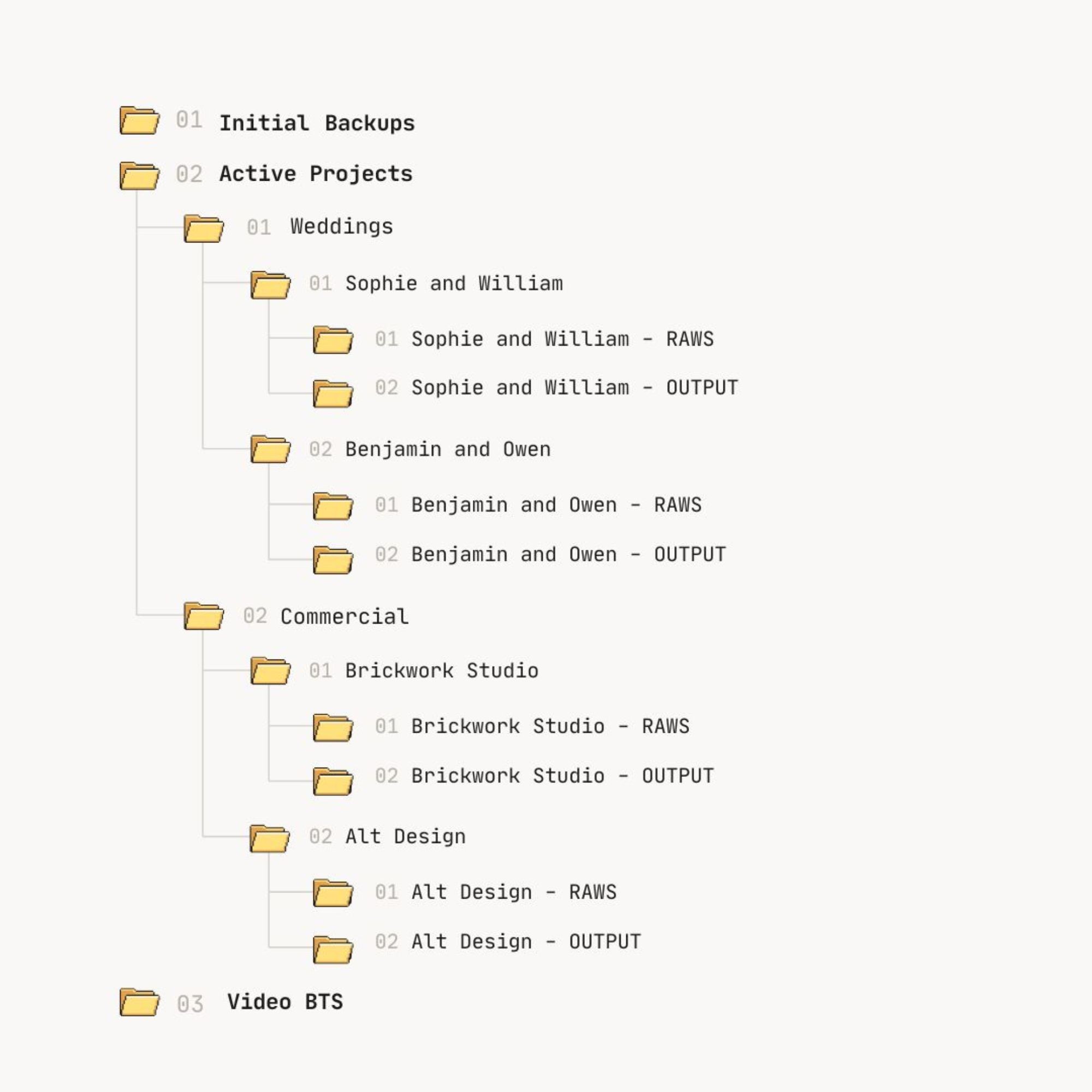
Folders created, numbered and named automatically
Optional cloud backup for your third copy
Every file verified on completion
Cull at speed
CHOOSE YOUR SELECTS TO EDIT, fast!

Full-screen review, keyboard-driven
Focus and sharpness checks built in
Star ratings that carry through to Lightroom
Light and Dark mode toggle
See ShotSafe in action - the full workflow, card to edit.

"So long PhotoMechanic! 👋"
Amy Elizabeth
Wedding photographer
Get ShotSafe
30-day money-back guarantee. No questions asked.
ShotSafe handles everything between getting home from a shoot and opening Lightroom. The folder creation, the dual-drive backup, the verification, the file moving, storing a copy in the cloud - all of it, you just have to select your favourites, but we help you with that to! The stuff that used to take an age now takes seconds. You’ll wonder where it’s been your whole career.
01 - Back up
Every image to two drives simultaneously. Verified. Automatic. You just have to name the project and give it a date, ShotSafe does the rest.
02 - Organise
Your folder structure built automatically. Named, numbered, organised and ready - without touching a single file yourself.
03 - Pick your best
Keyboard-driven culling built for speed. Rate, select, and move on. Faster than anything else in the market.
Every shoot, filed the same way. ShotSafe creates and names the folders for you.
Find any job in seconds - even the one from three years ago.

Ingest and Backup
Connect your card and ShotSafe gets to work immediately. Two drives backed up simultaneously, verified, and your folder structure built - before you’ve had time to make a cup of tea.
3
Copies of every image
One on your primary back up, one on a secondary, one in the cloud. Your images exist in three places, without you having to build or name a single folder, it's almost magic!
2
Physical hard drives
Dual-drive backup runs simultaneously and is verified on completion. If one drive fails, the other has everything. No exceptions.
1
Cloud backup
Dropbox, (Google Drive or Backblaze - coming in September 2026) - your images go directly from your Mac to your own cloud account. We never touch your files. Select to backup all of your RAWS, or just the ones you've chosen to edit/deliver.

Built with photographers. For photographers.
I'm Sam, a wedding photographer for fourteen years - over 500 weddings, all across Europe. Before that I graduated with a product design degree that I never really used. Turns out I was just waiting for the right thing to build.
Because the shooting was never the problem. It was everything after: getting home at midnight, dragging cards across to drives, second-guessing whether the backup actually worked, building the same folders I'd built a hundred times before, then sifting through thousands of images to select the edits. I used four different tools to do it. None of them talked to each other. Not one of them did the whole job the way I felt it could be done.
So I built it.
Three months of writing, two months of testing it with photographers around the world - the people whose feedback shaped nearly every decision in it. That's why it's built with photographers, not just for them.

Pricing
Built for Apple Silicon Macs (M1, M2, M3, M4 and later) running macOS 11 Big Sur or newer. Intel Mac support coming soon.
30-day money back guarantee. No questions asked.
Everything that’s included.
Dual-drive simultaneous backup
Backup verification on completion
Automatic folder naming and organisation
Numbered project structure, built instantly
Cloud backup - Dropbox (Google Drive/Backblaze coming September 2026.
Video files re-routed automatically to dedicated folder
Safe eject card after backup
Progress and selection tracking as you cull
Light and dark mode screen toggle
Keyboard-driven image culling
Full-screen sharpening and focus check
Image review and selection counter
Grid view with multi-select
Star ratings written to metadata
Ratings carry through to Lightroom
Promote selected images to Active Projects
Traffic-light backup indicators
Delivery deadline tracking - know what's due and what's overdue
macOS auto-updates - always on the latest version
“It saves me 2 hours on every single wedding.”
- Maz, wedding and family photographer
1. What exactly does ShotSafe do?
2. Is it a backup tool or a culling tool?
3. Will it work on my Mac?
4. What happens to my photos if I stop paying?
5. Do you use AI to cull or pick my photos?
6. Where do my images go? Are they private?
7. What if it's not for me?
Get ShotSafe
30-day money back guarantee. No questions asked.